Showing posts with label zoom. Show all posts
Showing posts with label zoom. Show all posts
Thursday, April 8, 2021
Create a Calendar Event from a Gmail Message
Have you ever decided to hold a meeting based on an email message thread, and then navigated back and forth between your Gmail and Google Calendar to create the event? Here is how you can make Gmail and Google Calendar do all of the work for you… PLUS an added-value trick you may not know about!


Monday, March 1, 2021
Create a Google Calendar Event with a Link to Your Zoom Room
I have been using a terrific Chrome browser extension for a few months now that makes it very easy to include a link to your Zoom room in your Google Calendar events. No more copying & pasting between your Zoom "Meetings" page and your Google Calendar event, as the selection is available directly in Google Calendar:

The Zoom for GSuite Chrome extension has worked so well for me over the last year (anyone have Zoom fatigue yet?) that I have become somewhat of an evangelist for it. I think you will like it, too.
Tuesday, January 2, 2018
Polling for Zoom Meetings
If you use Zoom, you probably appreciate its simple, yet full-featured interface. Don't you wish more tools took on that design philosophy? Here is a feature you may be interested in for creating multiple choice question for your Zoom meeting participants.
"You will be able to launch the poll during your meeting and gather the responses from your attendees. You also have the ability to download a report of polling after the meeting."
Read more here.
Tuesday, September 12, 2017
Moodle Zoom Activity
Zoom is Linn-Benton Community College's official webinar/online meeting tool for academic and administrative uses. Its full-featured, yet simple interface works great for video/audio or audio-only live and recorded meetings and screenshare sessions.
We have recently implemented a new Activity type in our Moodle system to make it easy for you and your students to connect via Zoom. All you have to do is turn Editing on in your Moodle course and click the "Add an activity or resource" link in the section where you want to add the Activity:
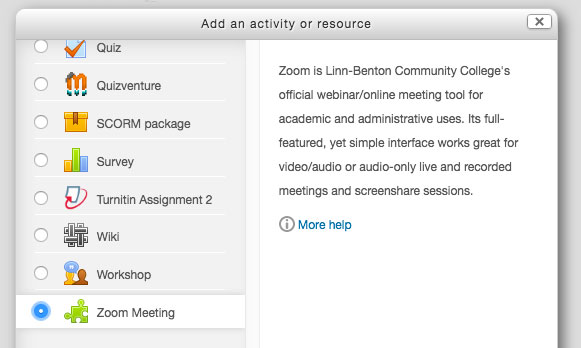
For first-time users, the Zoom Activity is configured to create new Zoom accounts on-the-fly, with usernames based on the Moodle account email address.
Zoom is very simple and easy to learn via our original "All About Zoom" post, as well as Zoom's Training Resources page.
We are interested in hearing about your impressions and experiences with Zoom, so please feel free to comment below!
Tuesday, May 9, 2017
All About ZOOM
Zoom is Linn-Benton Community College's official webinar/online meeting tool for academic and administrative uses. Its full-featured, yet simple interface works great for video/audio or audio-only live and recorded meetings and screenshare sessions.
If you don't have an LBCC Zoom account, make sure you are logged in to your LBCC Gmail account in another browser tab, and click here.
Below are some helpful videos on how to get started using Zoom in your teaching, and/or administrative workflow. Want to try a practice session first? Schedule some time with me. I'll get you up and running in Zoom in 15 minutes!
Subscribe to:
Posts (Atom)